Showing posts with label eigrp. Show all posts

Mar 13, 2013

Lesson 46 - EIGRP Fundamentals Part 4 - Troubleshooting


In this post I'd like to show you how problems in EIGRP can manifest themselves and how to find and fix problems that are less conspicuous. All in the scope of the CCNA level.
Pic. 1 - Topology Diagram.
Icons designed by: Andrzej Szoblik - http://www.newo.pl

Let's assume that this is a new system and your colleague who's not experienced enough tried to set it up but with no success. Some work was done and the task at hand is to connect successfully the branches with headquarter accomplishing full reachability.

The first thing I'm going to do is to learn the topology diagram to know the addresses and encapsulations which connect the branches with the HQ network.

I log in to R1 and here's my first finding. Check it out:

Pic. 2 - EIGRP First Error.
The above output sent to the console indicates that R1 receives hello packets on its local S0/2 interface from the wrong address (not on common subnet). The IP address of the sender is: 172.32.14.4. R1's interface S0/2 is configured as 172.31.14.1. Clearly wrong address is assigned onR4.

I jump over to R2 and correct the address on S0/2 and make sure it is EIGRP enabled by typing in a right 'network' statement.

R4 Configuration:

!
R4(config)#int s0/2
R4(config-if)#ip address 172.31.14.4 255.255.255.0
R4(config-if)#router eigrp 1
R4(config-router)#no network 172.32.0.0
R4(config-router)#network 172.31.0.0
R4(config-router)#
!

I perform a simple check: I want to make sure that R4's interface S0/2 is running EIGRP protocol. Here's the output:

Pic. 3 - R4's EIGRP Interfaces.

To my great surprise, the interface is EIGRP-enabled but there R1 is not listed as the neighbor (peer). The ping shows no problems reaching R1 (172.31.14.1).

In this situation I decide to use a 'debug' tool. Be careful using 'debug' commands as they may severely impact the operation of the router. More information on how to use debug in lesson 37.

I disable a timestamps so the output of the debug is clearer. As soon as the first information is sent to the screen, I disable debug using 'u all' command (in case you are in other mode than privileged '#' the 'do u all' is used. It is the alias for: 'undebug all'. Here's what the debug reports.

Pic. 4 - Debug EIGRP Packets.

The output reveals that the local router (R4) has problems with authentication of EIGRP packets. Opcode =  5 (authentication off or key-chain missing).

The 'show key chain' shows ... zilch! There's no key chain defined on R4. I need to do it. I'm going to do to errors while configuring key chain in order to show you how they show in the 'debug ip eigrp' statement.

Here's my first erroneous configuration:

R4 Configuration: 

!
R4(config)#key chain EIGRP
R4(config-keychain)#key 2
R4(config-keychain-key)#key-string cisco
R4(config-keychain-key)#
R4(config-keychain-key)#int s0/2
R4(config-if)#ip authentication mode eigrp 1 md5
R4(config-if)#ip authentication key-chain eigrp 1 EIGRP
R4(config-if)#
!

You noticed that I used the key 2. Since, the neighbor adjacency has not been built, I reach for the 'debug eigrp packets' again. Here's the output now:

Pic. 5 - Another Debug EIGRP Packets.

In the ton of gibberish I fish out the above message: 'key not defined or not live'. This is the cause of  the 'invalid authentication'

I check R1 and see that it uses key 1 and not key 2. The mismatch in the key number prevents theR1 and R4 from establishing adjacency.

I'll make one more mistake so that you can see another error related to authentication. Look at my key chain authentication on R4:

Pic. 6 - Running Configuration - Key Chain.
At first glance, all seems okay. But is it?

Still R1 and R4 are not neighbors. Let's debug one more time.
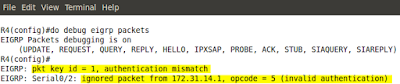
Pic. 7 - Debug EIGRP Packets.
This time there is no complaints about key number, but authentication still fails. The problem is with the password used. It does NOT match with the other end. Now, displaying configuration on both R1and R4 shows the password 'cisco'. But is it so? Check the below output on R4:
Pic. 8 - Show Key Chain.
A closer inspection shows that the password cisco is followed by a 'space' character which does not show in the 'show running-config'. This a cause of the problem.

One last error that shows without any debug. Check it out:

Pic. 9 - EIGRP Unsolicited Error Message.
The problem is with the K-values used by R5's neighbor (R2). They do not match on both ends. A quick look at R5 shows that default K-values are used.
Pic. 10 - Show IP Protocols on R5.

The same output on R2 reveals that it all K-values are used to calculate the metric. They do not match on both ends which results in lack of neighbor adjacencies between routers.
Pic. 11 - Show IP Protocols on R2.

A look at EIGRP configuration on R2:
Pic. 12 - EIGRP Configuration on R2.

 A quick fix on R2 and all is good!

R2 Configuration: 

!
R2(config)#router eigrp 1
R2(config-router)#no metric weights
R2(config-router)#
!


Incidentally, EIGRP unsolicited error messages are sent to the screen every few seconds which makes it hard to do the diagnostics. You can temporarily disable logging to the console 0 by typing:

R2(config)#no logging console 

To bring back the defaults:

R2(config)#logging console

In the next post, I'll look at the ACLs (Access Control Lists) and how they can serve different purposes in your network.

Lesson 45 - EIGRP Fundamentals Part 3 - The Lab


In this post I'll put the pieces together in the practice lab. Our topology will be as presented below:
Pic. 1 - Topology Diagram.
Icons designed by: Andrzej Szoblik - http://www.newo.pl

This post is going to collect bits and pieces from lessons 43 and 44 to show you the implementation on the command line interface with verification steps.

Task List

General requirements

  • All routers must use Autonomous System 1.
  • All networks/subnets must be advertised and reachable.
  • EIGRP authentication should be enabled between R1 and R4.
  1. Enable EIGRP between R1R2 and R3. Make sure loopbacks are advertised. Use the most specific wildcard mask.
  2. Enable EIGRP between R1 and R4. Make sure loopbacks are advertised. Use the most specific wildcard mask on R1. On R4 the network statement should be classful (no wildcard mask).
  3. Enable EIGRP between R2 and R5. Make sure loopbacks are advertised. Use the most specific wildcard mask on R2. On R5 the network statement should be classful (no wildcard mask).
  4. Enable EIGRP authentication between R1 and R4. Use the password 'cisco'.

Lab Solution

Step 1
Enable EIGRP between R1R2 and R3. Make sure loopbacks are advertised. Use the most specific wildcard mask.

Note!
The 'no auto-summary' keyword is not necessary in my topology, but I include it to show you how to disable automatic summarization to the class boundary.
R1 Configuration:

!
R1(config)#router eigrp 1
R1(config-router)#no auto-summary
R1(config-router)#network 172.31.123.1 0.0.0.0
R1(config-router)#network 172.31.1.1 0.0.0.0
R1(config-router)#
!

R2 Configuration:

!
R2(config)#router eigrp 1
R2(config-router)#no auto-summary
R2(config-router)#network 172.31.2.1 0.0.0.0
R2(config-router)#network 172.31.123.2 0.0.0.0
R2(config-router)#
!


Pic. 2 - EIGRP Adjacency Between R1 and R3.


R3 Configuration:

!
R3(config)#router eigrp 1
R3(config-router)#no auto-summary
R3(config-router)#network 172.31.3.1 0.0.0.0
R3(config-router)#network 172.31.3.17 0.0.0.0
R3(config-router)#network 172.31.123.3 0.0.0.0
R3(config-router)#
!

Verification:

Pic. 3 - R3's EIGRP-enabled nterfaces.
Pic. 3 confirms the network statement was correct for each interface.
Pic. 4 - R3's EIGRP Neighbor Table.

Notice!
R3 heard EIGRP hello packets from two neighbors. But to be sure they have exchanged their topology tables, the 'Q Cnt' column must show '0' messages pending (not acknowledged).

Notice!
In the 'output explanation' I show only the most relevant pieces of information. Others are either self-explanatory or not necessary to understand at the CCNA level.

Output Explanation:

  • H - Handle; shows order in which the neighbors were discovered and adjacency built between them.
  • Address - The IP address of the neighbor.
  • Interface - The  local interface where neighbors are discovered.
  • Hold - Length of time in seconds how long the router is going to wait for hello packet before declaring the neighbor down.
  • Uptime - Elapsed time since the local router first heard from the neighbor.
  • SRRT - Smooth Round Trip Timer; amount of time in milliseconds the required to send the packet to the neighbor and receive the acknowledgement.
  • RTO - Retransmit Time Out; amount of time in milliseconds the local router waits before retransmitting EIGRP packet if acknowledgement did not arrive.
  • Q Cnt - The number of EIGRP packets (update, query, reply) that the router keeps in the queue to be sent. Typically, it implies that some EIGRP reliable packets have not been acknowledged.
Pic. 5 - R3's EIGRP Topology Table.

Output Explanation:
  • P - Route is Passive which means that router is not actively looking for a path towards it. It is a required status in stable topology.
  • FD - Feasible Distance (metric value towards the destination)
  • (156160/128256) - The first number (156160) is FD, the second number (128256) is the Advertised Distance advertised by the neighbor (FD of the neighbor). Recall, the Feasibility Condition from the previous lessons.
Pic. 6 - R3's Routing Table.

Output Explanation:
  • D - EIGRP learned prefix; 'show ip route' shows all prefixes including connected networks with explanation of codes.
  • [90/156160] - The first number (90) is the Administrative Distance (trustworthiness) of the protocol, the second number (156160) is the metric based on best FD from the topology table.
  • via 172.31.2.1 - next-hop router (neighbor that advertised it).
  • 00:30:04 - how long ago the prefix was learned.
  • FastEthernet1/0 - The outbound interface towards the destination.
Pic. 7 - R3's EIGRP Details.
Your homework:
look at pic. 7 and consult my previous posts about EIGRP and the topology diagram to understand the highlighted parts.


Step 2
Enable EIGRP between R1 and R4. Make sure loopbacks are advertised. Use the most specific wildcard mask on R1. On R4 the network statement should be classful (no wildcard mask).

R1 Configuration:

!
R1(config-router)#network 172.31.14.1 0.0.0.0
R1(config-router)#
!

R4 Configuration:

!
R4(config)#router eigrp 1
R4(config-router)#no auto-summary
R4(config-router)#network 172.31.0.0
R4(config-router)#network 192.168.4.0
R4(config-router)#
!


Verification should be performed after this step (look at step 1).

Step 3
Enable EIGRP between R2 and R5. Make sure loopbacks are advertised. Use the most specific wildcard mask on R2. On R5 the network statement should be classful (no wildcard mask).

R2 Configuration:

!
R2(config-router)#network 172.31.25.2 0.0.0.0
R2(config-router)#
!


R5 Configuration:

!
R5(config)#router eigrp 1
R5(config-router)#no auto-summary
R5(config-router)#network 192.168.5.0
R5(config-router)#network 172.31.0.0
R5(config-router)#
!

Verification should be performed after this step (look at step 1).

Step 4
Enable EIGRP authentication between R1 and R4. Use the password 'cisco'.

R1 Configuration:

!
R1(config)#key chain MY_EIGRP_KEY
R1(config-keychain)#key 1
R1(config-keychain-key)#key-string cisco
R1(config-keychain-key)#
R1(config-keychain-key)#int s0/2
R1(config-if)#ip authentication key-chain eigrp 1 MY_EIGRP_KEY
R1(config-if)#ip authentication mode eigrp 1 md5
!


R4 Configuration (without prompts):

!
key chain MY_EIGRP_KEY
 key 1
   key-string cisco
!
interface Serial0/2
 ip address 172.31.14.4 255.255.255.0
 ip authentication mode eigrp 1 md5
 ip authentication key-chain eigrp 1 MY_EIGRP_KEY
!

Verification: 
Pic. 8 - R1's Neighbors.

R1 and R4 have re-established neighbor relationships.

In the next post, I'll present a few troubleshooting techniques based on the topology and configuration used in this lesson.

Lesson 44 - EIGRP Fundamentals Part 2 - Implementation


In the previous post (lesson 43) I have laid the foundations related to EIGRP terminology. Without understanding those keywords and their meaning it is hard to implement and analyze the behavior of this routing protocol.

The basic implementation steps, like in case of other routing protocols we have learned so far, requires two major steps:

  1. Enable EIGRP process in the 'config' mode.
  2. Instruct EIGRP which interfaces should participate in the EIGRP domain.
The second step is accomplished with the 'network' statement in the EIGRP routing context. This statement instructs EIGRP routing process which interfaces EIGRP will run on. The consequences of enabling EIGRP on the interface are similar to what we saw in OSPF configuration:
  • EIGRP-enabled interface begins to send EIGRP 'hello' packets in order to discover the neighbors. The address used to advertise these 'hello' packets is well-known, reserved multicast address: 224.0.0.10.
  • EIGRP-enabled interface allow the EIGRP process to read the address and network mask configured on this interface and advertise this network or subnet out other EIGRP-enabled interfaces where the neighbor(s) has/have been discovered and the relationship has been formed with them.
The 'network' statement can take a form of classful (as per IP class A, B, C; without a wildcard mask) or classless (using wildcard mask similar to OSPF) entry.

Also, worth noting here is that the command that starts the EIGRP process is followed by a number which is the Autonomous System number. Unlike OSPF which is the process ID and has local significance, AS number in EIGRP is important as it must match between the neighbors. Example of enabling EIGRP:

router eigrp 1

Number '1' is the Autonomus system number (between 1-65535) which must be the same on all EIGRP speaking routers in the domain.

The following list of parameters must match between EIGRP neighbors in order to successfully establish neighbor relationships: 

  1. Autonomous System number.
  2. K-Values (look at the previous lesson).
  3. If authentication is used both: the key number, the password, and the date/time the password is valid must match.
  4. The neighbors must be on common subnet (all IGPs follow this rule).
Since the 'network' keyword uses either a classful statement or it can take a wildcard mask (inversed mask) as its argument, consider the following four examples which accomplish the SAME goal: all interfaces of R3 are going to be EIGRP-enabled.
Pic. 1 - R3's 
Icons designed by: Andrzej Szoblik - http://www.newo.pl

Example 1

!
router eigrp 1
 network 172.31.0.0
!

Example 2 

!
router eigrp 1
 network 172.31.123.0 0.0.0.255
 network 172.31.3.0 0.0.0.15
 network 172.31.3.16 0.0.0.15
!

Example 3 

!
router eigrp 1
 network 172.31.123.0 0.0.0.255
 network 172.31.3.0 0.0.0.255
!

Example 4 

!
router eigrp 1
 network 172.31.123.3 0.0.0.0
 network 172.31.3.1 0.0.0.0
 network 172.31.3.17 0.0.0.0
!


They all achieve the same result: all interface become EIGRP-enabled.

EIGRP is partially a Distance Vector routing protocol. By default the automatic summarization to the class boundary takes place. The command that disables that behavior is: 'no auto-summary' used under EIGRP process.

EIGRP uses five different types of the packets to communicate. Three of them are reliable and must be acknowledged by the receiver. The EIGRP packets are as follows:

  1. Hello (unreliable).
  2. Updates (reliable).
  3. Queries (reliable).
  4. Replies (reliable).
  5. Acknowledgement (unreliable.

The last point I'd like to make relates to the ability of EIGRP to authenticate its packets. EIGRP currently (as of the time of writing this post) uses only one protocol which is MD5.

If you decide to configure authentication of EIGRP packets there are two major steps you must configure:

  1. Configure a key chain with the parameters such as the password(s) and the date/time they are valid.
  2. Apply authentication method and the key chain on per-interface basis.
Example of key chain configuration on R3 in Autonomous System 1. 
!
Key Chain Configuration
!
R3(config)#key chain EIGRP
R3(config-keychain)#key 1
R3(config-keychain-key)#key-string S3cr3t!!!
!
Enabling authentication on F1/0 interface - EIGRP AS 1 here
!
R3(config-if)#ip authentication mode eigrp 1 md5
R3(config-if)#ip authentication key-chain eigrp 1 EIGRP
R3(config-if)#
!

  • 'EIGRP' - The name of the key chain in my configuration. It can be any name.
  • 'key 1' - Number '1' must match be used on the neighbor's interface connected to R3's F1/0 interface.
  • 'S3cr3t!!!' - is the password used as the key 1. Must match between neighbors.
  • mode eigrp 1key-chain eigrp 1 - EIGRP AS number configured in the 'config' mode.
There are two other commands available under 'key 1' which I did not used:
  1. Accept-lifetime - date/time in which EIGRP packets signed with the digest based on the key-string will be accepted by the receiving router.
  2. Send-lifetime - date/time in which EIGRP packets will be signed using the key-string specified. The digest will be attached to all EIGRP packet types.
Since I did not use these two options (NTP time synchronization is needed), the key 1, using the password (here: S3cr3t!!!) is valid forever.


In the next post, I'm going to use this lesson's theory and put it into practice.

Lesson 43 - EIGRP Fundamentals Part 1 - Overview


EIGRP is a Cisco Proprietary Routing Protocol. It is classified as an Advanced Distance Vector solution. EIGRP is a fast, modern and robust routing protocol offering features we expect to find in the routing protocol these days (as of the time of writing this tutorial).

EIGRP Characteristics

  • Advanced Distance Vector Protocol - EIGRP routers, similarly to RIP, create the database in which only distance (how far) and direction (next-hop) are given. As a result of that, routers do not know the exact topology of the network. However, like in link-state algorithm, EIGRP routers are going to discover their neighbors using EIGRP Hello packets, form adjacency and exchange the routing databases reliably with their neighbors.
  • Flexible Design - EIGRP does not use the concept of areas found in OSPF. It is less demanding in terms of the design allowing less experienced engineers implement it quickly. It supports summarization of prefixes on per interface-basis (unlike OSPF which does it on ABRs/ASBRs only). 
  • Incremental Updates - Routing updates are not advertised periodically. They are exchanged reliably once (must beacknowledged). In stable network, only hello packets are transmitted between neighbors to maintain the relationship. In case of the topology change, the updates are sent to the routers that should receive it. The routers take into consideration how long it takes to send the reliable packet and get the response from a neighbor. Based on that, they determine how long they should wait to re-send the upate in case they did not get the acknowledgement. 
  • VLSM Support - Although EIGRP is primary Distance Vector Protocol, it is a classless protocol which supports variable length subnet masking. In order to turn it on, you must use the 'no auto-summary' keyword in the routing process 'config-router'.
  • Rapid Convergence - In case the EIGRP domain is designed with redundant connections and certain criteria are met (Feasibility Condition) a router can keep information about so called Feasible Successor(s) which are the second best path towards the destination (sort of a backup route). The difference between OSPF/RIP backup paths (second best routes) and EIGRP's feasible successor is that in the latter protocol, the traffic is redirected immediately without recomputing the routing table.
  • Multicast - EIGRP uses multicast and unicast transmissions. Multicast address reserved for EIGRP is 224.0.0.10.
  • 100% Loop Free - The Diffusing Update Algorithm (DUAL) which EIGRP uses, guarantees there are not going to be any loops formed which Distance Vector algorithms are susceptible to (thanks to the Feasibility Condition).
  • Equal and Unequal Cost Load Balancing - EIGRP routers can utilize different paths with different metric performing a load balance. The router calculates the appropriate ratio regarding how many packet should be sent out the interface based on the difference in the metric value between these multiple paths available.
  • Support for multiple layer 3 protocols - EIGRP can natively support IP,  IPX and Apple-Talk protocols (altough in today's IP world this is no longer a major advantage).
Based on my experience with EIGRP (personal opinion), the two major disadvantages of EIGRP are:
  • It is very chatty if the network is not properly designed. Explanation of the design is beyond the scope of this tutorial.
  • It is a Cisco proprietary routing protocol which means it won't work on routers from different vendors.
Terminology

EIGRP Databases
EIGRP creates three databases, similarly to OSPF:
  • Neighbor Table - Lists all neighbors discovered with which it formed adjacency and exchanged routing information.
  • Topology Table - Lists all the paths to all destinations learned. However, it shows only metric and the next-hop router and does not illustrate the real topology like OSPF LSDB.
  • Routing Table - The best metric routes are going to be used to send the traffic. 
EIGRP Composite Metric
EIGRP calculates the metric using pretty complex formula which is beyond the scope of the CCNA tutorial. It is referred to as composite metric. EIGRP uses five different components (so called K-values) to determine the value of the metric. Thus, the composite metric. One of them, MTU (Maximu Transmission Unit), is not factored in directly but changes the way the value is calculated.

By default EIGRP uses two parameters in this magical formula:

  • Bandwidth
  • Delay
All K-values can be seen using: 'show ip protocols' command if EIGRP has been configured. The K-values listed are as follows:
  • K1 - Bandwidth
  • K2 - Load
  • K3 - Delay 
  • K4 - Reliability
  • K5 - MTU
They can be used for traffic engineering (overriding normal route selection process). This helps to address issues with unde/over utilized links. However, configuring additional K-values to accomplish that is not recommended unless an administrator is experienced with EIGRP and knows their network very well.

Topology Database
Terms to remember:

  • Advertised Distance - The best metric a router receives from the neighbor (next-hop device) to a given destination network/subnet. In some documentations it is also referred to as the Reported Distance. Do not confuse this term with Administrative Distance which is the ranking of routing protocols.
  • Feasible Distance -  The total metric value which is a sum of the Advertised Distance and the metric to reach the neighbor (next-hop router towards the destination).
  • Feasibility Condition - The situation in which the Advertised Distance value provided by a alternate neighbor(s) (their best metric) is lower than the best Feasible Distance (metric) through the best router(s) to reach the destination (successor: look below).
  • Feasible Successor - The second best route(s) to a given destination. The router(s) which is/are the second best next-hop router(s) to a given destination meeting the FD (Feasibility Condition).
  • Successor - The best route to a given destination (the least cost metric)
In order to understand the above terms and EIGRP behavior better, let's analyze the process of advertising 192.168.1.0 by R5.

R5 advertises its directly connected network with the metric value of 1. R2R3 and R4 will add their own cost to reach R5 (Pic. 1). The sum of 1 + COST_TO_R5 becomes their successor (best metric). Then we add the R1 to this topology and let's analyze what R1 receives from three neighbors. Take a look at the pic. 1.

Pic. 1 - EIGRP Terminology.
Icons designed by: Andrzej Szoblik - http://www.newo.pl

R1 receives the prefix 192.168.1.0/24 from three neighbors (R2R3R4). It calculates the metric value by adding the cost to reach the neighbor (in red) to the metric advertised by this neighbor (in blue aka the advertised distance). The metric (cost if you will, or composite metric to be accurate) that is the lowest becomes the successor route (the best route). If however, other neighbor(s) advertise metric (Advertised Distance) that is lower than the least cost path, this neighbor or these neighbors become the second best next-hop routers towards the destination 192.168.1.0/24 and they are called feasible successors according to the Feasibility Condition:

AD < FD

In such situation, if the best route is not available, the feasible successor (second best) is used immediately without any re-computation of the routing table.

In our Pic.1, R2 is the successor towards 192.168.1.0/24, but R3 becomes the feasible successor (second best gateway) since its advertised distance is 20. This number is lower than the best feasible distance which is 21.
In the next post I will present the basic implementation and verification steps regarding EIGRP.