Showing posts with label best. Show all posts

Mar 13, 2013

Lesson 43 - EIGRP Fundamentals Part 1 - Overview


EIGRP is a Cisco Proprietary Routing Protocol. It is classified as an Advanced Distance Vector solution. EIGRP is a fast, modern and robust routing protocol offering features we expect to find in the routing protocol these days (as of the time of writing this tutorial).

EIGRP Characteristics

  • Advanced Distance Vector Protocol - EIGRP routers, similarly to RIP, create the database in which only distance (how far) and direction (next-hop) are given. As a result of that, routers do not know the exact topology of the network. However, like in link-state algorithm, EIGRP routers are going to discover their neighbors using EIGRP Hello packets, form adjacency and exchange the routing databases reliably with their neighbors.
  • Flexible Design - EIGRP does not use the concept of areas found in OSPF. It is less demanding in terms of the design allowing less experienced engineers implement it quickly. It supports summarization of prefixes on per interface-basis (unlike OSPF which does it on ABRs/ASBRs only). 
  • Incremental Updates - Routing updates are not advertised periodically. They are exchanged reliably once (must beacknowledged). In stable network, only hello packets are transmitted between neighbors to maintain the relationship. In case of the topology change, the updates are sent to the routers that should receive it. The routers take into consideration how long it takes to send the reliable packet and get the response from a neighbor. Based on that, they determine how long they should wait to re-send the upate in case they did not get the acknowledgement. 
  • VLSM Support - Although EIGRP is primary Distance Vector Protocol, it is a classless protocol which supports variable length subnet masking. In order to turn it on, you must use the 'no auto-summary' keyword in the routing process 'config-router'.
  • Rapid Convergence - In case the EIGRP domain is designed with redundant connections and certain criteria are met (Feasibility Condition) a router can keep information about so called Feasible Successor(s) which are the second best path towards the destination (sort of a backup route). The difference between OSPF/RIP backup paths (second best routes) and EIGRP's feasible successor is that in the latter protocol, the traffic is redirected immediately without recomputing the routing table.
  • Multicast - EIGRP uses multicast and unicast transmissions. Multicast address reserved for EIGRP is 224.0.0.10.
  • 100% Loop Free - The Diffusing Update Algorithm (DUAL) which EIGRP uses, guarantees there are not going to be any loops formed which Distance Vector algorithms are susceptible to (thanks to the Feasibility Condition).
  • Equal and Unequal Cost Load Balancing - EIGRP routers can utilize different paths with different metric performing a load balance. The router calculates the appropriate ratio regarding how many packet should be sent out the interface based on the difference in the metric value between these multiple paths available.
  • Support for multiple layer 3 protocols - EIGRP can natively support IP,  IPX and Apple-Talk protocols (altough in today's IP world this is no longer a major advantage).
Based on my experience with EIGRP (personal opinion), the two major disadvantages of EIGRP are:
  • It is very chatty if the network is not properly designed. Explanation of the design is beyond the scope of this tutorial.
  • It is a Cisco proprietary routing protocol which means it won't work on routers from different vendors.
Terminology

EIGRP Databases
EIGRP creates three databases, similarly to OSPF:
  • Neighbor Table - Lists all neighbors discovered with which it formed adjacency and exchanged routing information.
  • Topology Table - Lists all the paths to all destinations learned. However, it shows only metric and the next-hop router and does not illustrate the real topology like OSPF LSDB.
  • Routing Table - The best metric routes are going to be used to send the traffic. 
EIGRP Composite Metric
EIGRP calculates the metric using pretty complex formula which is beyond the scope of the CCNA tutorial. It is referred to as composite metric. EIGRP uses five different components (so called K-values) to determine the value of the metric. Thus, the composite metric. One of them, MTU (Maximu Transmission Unit), is not factored in directly but changes the way the value is calculated.

By default EIGRP uses two parameters in this magical formula:

  • Bandwidth
  • Delay
All K-values can be seen using: 'show ip protocols' command if EIGRP has been configured. The K-values listed are as follows:
  • K1 - Bandwidth
  • K2 - Load
  • K3 - Delay 
  • K4 - Reliability
  • K5 - MTU
They can be used for traffic engineering (overriding normal route selection process). This helps to address issues with unde/over utilized links. However, configuring additional K-values to accomplish that is not recommended unless an administrator is experienced with EIGRP and knows their network very well.

Topology Database
Terms to remember:

  • Advertised Distance - The best metric a router receives from the neighbor (next-hop device) to a given destination network/subnet. In some documentations it is also referred to as the Reported Distance. Do not confuse this term with Administrative Distance which is the ranking of routing protocols.
  • Feasible Distance -  The total metric value which is a sum of the Advertised Distance and the metric to reach the neighbor (next-hop router towards the destination).
  • Feasibility Condition - The situation in which the Advertised Distance value provided by a alternate neighbor(s) (their best metric) is lower than the best Feasible Distance (metric) through the best router(s) to reach the destination (successor: look below).
  • Feasible Successor - The second best route(s) to a given destination. The router(s) which is/are the second best next-hop router(s) to a given destination meeting the FD (Feasibility Condition).
  • Successor - The best route to a given destination (the least cost metric)
In order to understand the above terms and EIGRP behavior better, let's analyze the process of advertising 192.168.1.0 by R5.

R5 advertises its directly connected network with the metric value of 1. R2R3 and R4 will add their own cost to reach R5 (Pic. 1). The sum of 1 + COST_TO_R5 becomes their successor (best metric). Then we add the R1 to this topology and let's analyze what R1 receives from three neighbors. Take a look at the pic. 1.

Pic. 1 - EIGRP Terminology.
Icons designed by: Andrzej Szoblik - http://www.newo.pl

R1 receives the prefix 192.168.1.0/24 from three neighbors (R2R3R4). It calculates the metric value by adding the cost to reach the neighbor (in red) to the metric advertised by this neighbor (in blue aka the advertised distance). The metric (cost if you will, or composite metric to be accurate) that is the lowest becomes the successor route (the best route). If however, other neighbor(s) advertise metric (Advertised Distance) that is lower than the least cost path, this neighbor or these neighbors become the second best next-hop routers towards the destination 192.168.1.0/24 and they are called feasible successors according to the Feasibility Condition:

AD < FD

In such situation, if the best route is not available, the feasible successor (second best) is used immediately without any re-computation of the routing table.

In our Pic.1, R2 is the successor towards 192.168.1.0/24, but R3 becomes the feasible successor (second best gateway) since its advertised distance is 20. This number is lower than the best feasible distance which is 21.
In the next post I will present the basic implementation and verification steps regarding EIGRP.

Mar 12, 2013

Lesson 32 - Route Selection Process Demistified


It is imperative to know how a router selects the best path to some destination network/subnets if it has more than one to choose from. At least if you are serious about learning the routing principles. In this post I'm going to show you the algorithm a router uses to discriminate between multiple paths to the same destination.

A router can learn the routes to remote networks and subnets using manual instructions or by means of configuring routing protocols. This way routers learn how to reach destination networks/subnets dynamically. This post's primary focus is about Interior Gateway Protocols(IGPs) such as: RIP, OSPF, EIGRP. The only Exterior Gateway Protocol (EGP) we use nowadays is called BGP. It uses a bit more complex decision making process and is beyond the scope of this tutorial. In the future I am going to talk about it in more detail in the workbooks I plan to post in the future.

First things first. There are three terms I need to define in order to explain the process of selecting the best route. These are:

  1. The Longest Match Rule
  2. Administrative Distance
  3. Metric
The Longest Match Rule
In the previous post I showed you an example of routing table with a brief explanation about what each column in the output represented. Pic. 1 is the graphic equivalent of it.

When a router receives a packet, while processing the header, it is the DESTINATION IP address that is compared with the entries in the routing table in order to determine the next step. This next step is to find the egress (outbound) interface and the address of the next device to send the packet to. This form of routing is known as the destination-based routing. The process of comparing the destination IP with the prefixes int the routing table is done bit by bit (yes, routers see IP addresses in the binary notation). The entry that has the longest number of network bits that match the IP destination address is always the best match (best path). This is always the FIRST thing a router checks.

If there is ONLY ONE best match, a router has a simple task to do. It moves the packet to the outbound interface (egress) and encapsulates the packet in the layer 2 header according to the technology/protocol that is used on the outbound interface (Ethernet, PPP, HDCL, Frame-Relay etc.). Then, the frame is converted to bits and placed onto the wire/fiber optic cable.


NOTICE!
If the outbound interface is a multi-access interface (such as Ethernet, Frame-Relay, ATM etc.), the router must know the layer 2 identifier of the next-hop device (layer 3 to layer 2 address resolution). For instance, in case the outbound interface is Ethernet, the MAC address of the next-hop device must be in the router's arp cache (if not found, the arp query is sent). In case, the egress interface is of a point-to-point type (subinterface point-to-point or protocol such as PPP, HDLC etc. is used), there is NO layer 3 to layer 2 resolution being performed. The packet is simply encapsulated in layer 2 frame sent out that interface.


Let's consider the example depicted in pic. 1.

Pic. 1 - The Longest Match Rule.

In this example the router receives an IP packet. The DESTINATION Address in the packet is172.31.1.33. The router is going to compare this address (bit by bit), with the prefixes (address/network-mask) in the routing table presented, trying to find the closest match (the number of bits that are the same). The entry that is the best match will give the router instructions as to what is the address of the next-hop device (here another router) and the outbound interface.

Let's play the router's game and compare all the entries with the DESTINATION IP address of the packet.

There are three candidate entries pointing to three different next-hop routers and three different outbound interfaces (pic. 1). The pic. 2 shows these numbers in the binary notation.

Pic. 2 - Destination IP Address Comparison.

Clearly, when converted into binary, the first entry shows the best match . The number of identical bits between the packet's destination address and router's knowledge about the subnet is 28 identical bits (highlighted in red). The second entry has only 24 identical bits, and the third one, only 16 bits match the destination IP address (class B network address). That is why the egress interface for the packet towards 172.31.1.33 is FastEthernet0/0 (pic. 1).

So far, we have only dealt with the situation in which there is a SINGLE best match. What if there are more than one entries (paths available) in the routing table with the EXACT same longest match?

There are two other parameters a router uses to break the tie:

  1. Administrative Distance
  2. Metric
Administrative Distance
There are the situations that your router(s) may use more than one source of information. Not that you create such situation on purpose. You are better off using one protocol (e.g. OSPF), but reality bites and sometimes you have to support more than one routing protocol in the same routing domain. In such situations your router may receive the same prefix(es) from different sources. As a result of that multiple sources (RIP, OSPF, EIGRP etc.) provider the router with the EXACT same prefix (address/network-mask).

In order to deal with situations like this, Cisco have created a ranking which assign the protocols (sources of information) different levels of "trustworthiness" (if that's a word). This level of "believability" is expressed with the arbitrarily allocated value that is given to different sources of information. This parameter is called: Administrative Distance (or just 'distance'). The LOWER the value of AD is, the more trusted the source of information is going to be.

Consider the pic. 3. The router receives EXACT same prefix (192.168.1.0/24) from two different sources: RIP and OSPF. Since this is going to cause an issue as to which one is better, AD is going to break the tie. OSPF is more trusted than RIP as it has lower value of Administrative Distance assigned to it (110) compared to RIP's (120).

There are many reasons why RIP is less trusted source than OSPF, but explaining it in detail is beyond of the scope of this post. Needless to say, if you do not like Cisco arbitrarily set values, there are ways of changing them. The commands are different for different protocols, and when we get to advanced topics (hopefully), I'm going to show them to you.

Pic. 3 - Advertisement Come from Different Sources (Protocols).

Icons designed by: Andrzej Szoblik - http://www.newo.pl

I have included a few AD values for the most often used protocols to get you going. For more information on that go to Cisco web site. Of course the best way of finding the values is to use my favorite search engine: google ;).

Metric
Another situations that might put a router in a difficult position regarding which path is the best occurs when there are multiple longest match entries in the routing table, coming from the same source. Or more accurately speaking, there are multiple best matches (EXACT prefixes) having the same value of Administrative Distance (AD).

In such situations, the tie-breaker is going to be the LOWEST value of the METRIC.

A metric is the value calculated for each prefix and expresses, for the lack of better word, how far the destination is. The lower the value, the more preferred the path is.

Keep in mind, that the type of metric routing protocols use (the way they calculate it) is different between them and totally INCOMPATIBLE. They use different ways and factors to calculate their metric.

Just to give you a few examples, RIP uses the concept of hop-count. The number (metric) tells the router how many routers the packet must traverse before it reaches the destination.

OSPF on the other hand, uses the cost as its metric. It is calculated based on the bandwidth of the interfaces (links) in the path. This way, its metric is far more sophisticated and more suitable for our networks compared to RIP.

As you see it is not the coincidence that OSPF is more trusted source of information compared to RIP.

Consider the following example (pic. 4).

Pic. 4 - An Example of Metric Types.
Icons designed by: Andrzej Szoblik - http://www.newo.pl

If in your design you decided to use RIP in the above topology, the router A, would choose the best path towards 10.2.2.0/24 through router B. This is because the metric used by RIP takes into consideration the number of routers the packet has to traverse, and nothing else. The path throughrouter B is better (1 hop), as opposed to the path through routers CDB (3 hops). RIP does not factor in the bandwidth of the links in the path.

If you chose to use OSPF instead, the number of hops (routers the packet is going to go through) is irrelevant. OSPF makes forwarding decisions based on the bandwidth available in the paths. This way, OSPF prefers path through routers CDB, rather than through router B (much faster links available).

More on the topic of metrics in the upcoming posts. Now, that you have learned about the factors that help routers determine the best path, you are ready to take a look at the algorithm.

  1. Prefer the path with the longest match entry in the routing table (irrespective of the metric or AD).
  2. In case there are multiple best matches available, check the AD value (if they come from the same source). Choose the source of information with the lowest AD. 
  3. If the best match prefixes (more than one) come from the source with the same AD, choose the lowest metric number.
The same order of operation is presented in the pic. 5.


NOTICE!
When considering Border Gateway Protocol, its metric is very complex (not a single number like all Interior Gateway Protocols tend to use). As a result of that, the rules of finding the best route are also more complex and are beyond the scope of this post.


Pic. 5 - Route Selection Process.

Traffic Sharing
One last scenario. What if a router receives more than one exact longest match prefixes that have the same values of AD and the metric?

All of them are the best candidates and the router performs load sharing (load balancing) using all of the egress interfaces that are the best. Of course, whether it is per-packet, or per flow load-balancing depends on the switching engine configuration of your router.

I hope you have caught the idea by now. Check yourself by answering the following question. You will find the answers for all scenarios presented at the bottom of this post.

Practical Question
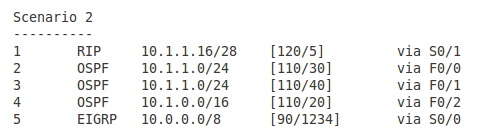
The IP packet has the destination address of 10.1.1.17. The third column on the left is the prefix learned. Which entry in the routing table (number in first column) is going to be the best in the following scenarios? Which outbound interface is going to be used?

Pic. 6 - Scenario 1.

 Pic. 7 - Scenario 2.


Pic. 8 - Scenario 3.
Pic. 9 - Scenario 4
Pic. 10 - Scenario 5

The answers to the question (all scenarios)
Scenario 1
Entry 2 is the correct answer. The egress interface is F0/0.
The router looks for the longest match in the routing table first. Entry 2 learned from RIP has the longest number of bits that are identical with the destination IP (it is the most specific). The remaining sources (OSPF and EIGRP) have fewer bits that match the destination address (they are less specific). The fact that they are more trusted does not apply here since the longest match is always preferred.

Scenario 2
Entry 1 is the correct answer. The egress interface is S0/1.
Just like in the scenario 1, the router looks for a longest match in the routing table first.
Entries 4 and 5 have 8 bits and 16 bits in common with the destination address respectively. Entries 2 and 3 have 24 bits in common. The longest match is the entry 1 having 28 networking bits that are identical with the IP address 10.1.1.17. You can check it by converting the last byte into the binary notation.

Scenario 3
Entry 2 is the correct answer. The egress interface is F0/0.
We can safely rule out the Entries 1 and 4 due to the length of network mask (not the best matches). We're left with Entries 2 and 3. Both have the same number of bits that are identical bits with the destination address (24). Both prefixes come from the same source (OSPF) and as a result of that have the same Administrative Distance value = 120. The tie breaker is going to be the metric value. Entry 2 has a cost of 30 and entry 4 has cost of 40. The lowest is the preferred one.

Scenario 4
Entry 2 is the correct answer. The egress interface is S0/0.
All five entries have the same length of prefix mask, so after longest match rule check we have five candidates.  However, entries 4 and 5 come from OSPF and have higher AD (120) than the first three entries coming from EIGRP routing protocol (90). The lower AD here is preferred. We can rule 4 and 5 out now. Again, all three of them left, have the same AD (90). The tie-breaker is the value of metric again.

Scenario 5
Entries 1 through 3 are the correct answer. The egress interfaces are S0/0, S0/1, and S0/2. The router is going to perform load balancing (traffic sharing).
We can rule out entries 4 and 5 like in the scenario 4. The remaining entries 1 through 3 come from EIGRP (AD=90) and their metrics are the same.