Try to think of this post as your opportunity to put the extended ACLs into practice. Do not look at the solutions which are presented at the end of this post. Try to accomplish the tasks using IOS help '?' If you have found this difficult, you can look at the solutions and watch my videos I posted on Youtube. ACL related video links can be found at the bottom of this post.
The last video shows the syntax and benefits of using Named ACLs. Once you get to know named ACLs, you will not want to use numbered ones.
Look at this simple topology below first. Then
Assumptions
You are in charge of R1 and R2 routers. R3 belongs to your Service Provider network (SP) and simulates Internet in our examples. If you want to enable HTTP access on the router, type in the 'config' mode:
ip http server
Static routing has been configured between routers.
Task 1
Configure an access-list disabling anyone TELNET to R1 and all devices behind it (R2) if the traffic is originated from Internet (here: SP). All other traffic should be permitted.
Task 2
On R1 remove the previous ACL and configure a new one allowing only HTTP access to 172.16.102.0/24 if the traffic is originated from Internet (here: SP). All other traffic should be discarded.
Task 3
On R1 remove previously configured access-list. Instead, allow the returning traffic from HTTP (172.16.102.0/24) towards any destination. All other traffic from 172.16.102.0/24 should be discarded.
Task 4
Remove previously configured ACL. Configure an access-list that blocks the TELNET/SSH traffic toR1 if the traffic is originated by 10.1.13.3 address. Use a standard ACL.
Task 1
R1 Configuration:
Verification:


Task 2
R1 Configuration:
Notice!
There is an 'implicit' deny all at the end of the ACL that is why I do not have to use: 'deny ip any any' statement.
Verification:

Notice!
I got the connection to port 80 and terminated session using GET command. In order for the router to accept incoming connection to TCP 80 (WWW), you must type in the following command in the 'config' mode:
ip http server
Task 3
R1 Configuration (one way of accomplishing the goal):
Task 4
Remove previously configured ACL. Configure an access-list that blocks the TELNET/SSH traffic toR1 if the traffic is originated by 10.1.13.3 address. Use a standard ACL.
R2 Configuration:
Notice!
Because I forgot to mention this little contraption in my Standard ACL post, here it is. A standard ACL can be used to block traffic to ports VTY (remote access). The ACL is applied using the:access-class statement.

Notice!
Changing the source of my TELNET (lo0=172.16.103.3) allows me to login.
In my next post, I'll attempt to explain Network Address Translation (NAT) which you must be familiar at CCNA level (as of the time of posting it).
The last video shows the syntax and benefits of using Named ACLs. Once you get to know named ACLs, you will not want to use numbered ones.
Look at this simple topology below first. Then

Extended ACL Lab
Assumptions
You are in charge of R1 and R2 routers. R3 belongs to your Service Provider network (SP) and simulates Internet in our examples. If you want to enable HTTP access on the router, type in the 'config' mode:
ip http server
Static routing has been configured between routers.
Task 1
Configure an access-list disabling anyone TELNET to R1 and all devices behind it (R2) if the traffic is originated from Internet (here: SP). All other traffic should be permitted.
Task 2
On R1 remove the previous ACL and configure a new one allowing only HTTP access to 172.16.102.0/24 if the traffic is originated from Internet (here: SP). All other traffic should be discarded.
Task 3
On R1 remove previously configured access-list. Instead, allow the returning traffic from HTTP (172.16.102.0/24) towards any destination. All other traffic from 172.16.102.0/24 should be discarded.
Task 4
Remove previously configured ACL. Configure an access-list that blocks the TELNET/SSH traffic toR1 if the traffic is originated by 10.1.13.3 address. Use a standard ACL.
Extended ACL Lab
Task 1
Configure an access-list disabling anyone TELNET to R1 and all devices behind it (R2) if the traffic is originated from Internet (here: SP). All other traffic should be permitted.
R1 Configuration:
!
R1(config)#access-list 100 deny tcp any any eq telnet
R1(config)#access-list 100 permit ip any any
R1(config)#int s0/1
R1(config-if)#ip access-group 100 in
R1(config-if)#end
R1#
R1(config)#access-list 100 permit ip any any
R1(config)#int s0/1
R1(config-if)#ip access-group 100 in
R1(config-if)#end
R1#
!
Verification:
Pic. 2 - Ping from R3.

Pic. 3 - Telnet Test from R3.
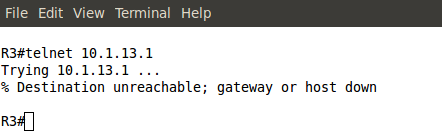
Pic. 4 - ACL Statistics.

Task 2
On R1 remove the previous ACL and configure a new one allowing only HTTP access to 172.16.102.0/24 if the traffic is originated from Internet (here: SP). All other traffic should be discarded.
R1 Configuration:
!
R1(config)#no access-list 100
R1(config)#int s0/1
R1(config-if)#no ip access-group 100 in
R1(config-if)#exit
R1(config)#
R1(config)#access-list 101 permit tcp any host 172.16.102.2 eq www
R1(config)#int s0/1
R1(config-if)#ip access-group 101 in
R1(config-if)#
R1(config)#int s0/1
R1(config-if)#no ip access-group 100 in
R1(config-if)#exit
R1(config)#
R1(config)#access-list 101 permit tcp any host 172.16.102.2 eq www
R1(config)#int s0/1
R1(config-if)#ip access-group 101 in
R1(config-if)#
!
Notice!
There is an 'implicit' deny all at the end of the ACL that is why I do not have to use: 'deny ip any any' statement.
Verification:
Pic. 5 - ACL Test.

I got the connection to port 80 and terminated session using GET command. In order for the router to accept incoming connection to TCP 80 (WWW), you must type in the following command in the 'config' mode:
ip http server
Task 3
On R1 remove previously configured access-list. Instead, allow the returning traffic from HTTP (172.16.102.0/24) towards any destination. All other traffic from 172.16.102.0/24 should be discarded.
R1 Configuration (one way of accomplishing the goal):
!
R1(config)#int s0/1
R1(config-if)#no ip access-group 101 in
R1(config-if)#exit
R1(config)#no access-list 101
R1(config)#
R1(config)#access-list 102 permit tcp 172.16.102.0 0.0.0.255 eq 80 any
R1(config)#int f1/0
R1(config-if)#ip access-group 102 in
R1(config-if)#
R1(config-if)#no ip access-group 101 in
R1(config-if)#exit
R1(config)#no access-list 101
R1(config)#
R1(config)#access-list 102 permit tcp 172.16.102.0 0.0.0.255 eq 80 any
R1(config)#int f1/0
R1(config-if)#ip access-group 102 in
R1(config-if)#
!
Task 4
Remove previously configured ACL. Configure an access-list that blocks the TELNET/SSH traffic toR1 if the traffic is originated by 10.1.13.3 address. Use a standard ACL.
R2 Configuration:
!
R1(config)#int f1/0
R1(config-if)#no ip access-group 102 in
R1(config-if)#exit
R1(config)#no access-list 102
R1(config)#
R1(config)#access-list 1 deny host 10.1.13.3
R1(config)#access-list 1 permit any
R1(config-if)#no ip access-group 102 in
R1(config-if)#exit
R1(config)#no access-list 102
R1(config)#
R1(config)#access-list 1 deny host 10.1.13.3
R1(config)#access-list 1 permit any
R1(config)#
R1(config)#line vty 0 4
R1(config-line)#access-class 1 in
R1(config-line)#exit
R1(config)#
R1(config)#line vty 0 4
R1(config-line)#access-class 1 in
R1(config-line)#exit
R1(config)#
!
Notice!
Because I forgot to mention this little contraption in my Standard ACL post, here it is. A standard ACL can be used to block traffic to ports VTY (remote access). The ACL is applied using the:access-class statement.
Pic. 6 - Verification.

Notice!
Changing the source of my TELNET (lo0=172.16.103.3) allows me to login.
In my next post, I'll attempt to explain Network Address Translation (NAT) which you must be familiar at CCNA level (as of the time of posting it).


